weeks <<
Previous Next >> week6~week9
week1~week5
week1
text:
1.下載2019Fall可攜套件.7z (編譯 Solvespace 用),完成後開啟。
2.登入個人github帳號,創建新的倉儲cd2020。
3.進入要存放的資料夾
4.輸入git clone https://github.com/s40723246/cd2020 。
5.輸入git submodule add https://github.com/mdecourse/cmsimde.git 。
6.將up_dir的裡的資料複製到cd2020。
7.完成後,python wsgi.py 開始編輯倉儲。
8.編輯完成後, git add . > git commit -m " " > git push。
week2
第一組第一次直播會議
第一組 第一次會議PDF內容 (WEEK1)
會議流程:
1.成員簽到
2.討論日後分工
3.有問題的同學提出問題
成員名單
1.40723201 (簽) 已建立完成網站
2.40723206 (簽) 已建立完成網站 小組長
3.40723213 (簽) 已建立完成網站
4.40723216 (簽) 已建立完成網站
5.40723223 (簽) 已建立完成網站
6.40723226 (簽) 已建立完成網站
7.40723229 (簽) 已建立完成網站 小組長
8.40723230 (簽) 無進度
9.40723241 (簽) 已建立完成網站
10.40723242 (簽) 已建立完成網站 小組長
11.40723246 (group leader) (簽) 已建立完成網站
12.40732319 (簽) 無進度
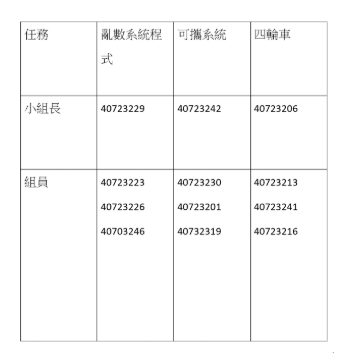
日後小組分工
1.由(40723201、40723206、40723230、40723241、40723246),已經建立好網站及編輯完網站的同學,前去協助還沒完成的同學,及分配工作
2.40723213、40723242督處尚未完成的同學,互相協助來完成第一周課程
3.40723223、40723223負責處理小組會議
4.40723246 負責製作小組會議PDF
5.40723241、40723216提醒小組問題及完成分組作業
組員會議中提醒的事項:
1.網站的格式及編譯
2.其餘的工作分配
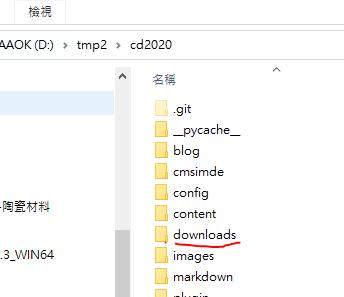
3.PDF放倉儲的download及如何放置
week3
由成員執行任務並編譯整理製作PDF
1. Describe how to do an efficient random grouping for this course or do the roll calling randomly?
2. Describe how to prepare a portable Python programming system for Windows 10 64bit system to allow one the maintain CMSiMDE website, Pelican blog and Reveal.js presentation on Github?
3. What do you need to know from http://www.coppeliarobotics.com/helpFiles/index.html to implement a four-wheeled robot?
CoppeliaSim User Manual
translation Simulation ~ PDF
week4
本周各組員皆須對各組員繳交之Assignment 1進行評分及進度說明影片
報告影片:
PDF內容描述(有字幕)
40723242進度影片
40723246進度影片
40723223進度影片
40723241進度影片
40723229進度影片
weeks <<
Previous Next >> week6~week9